
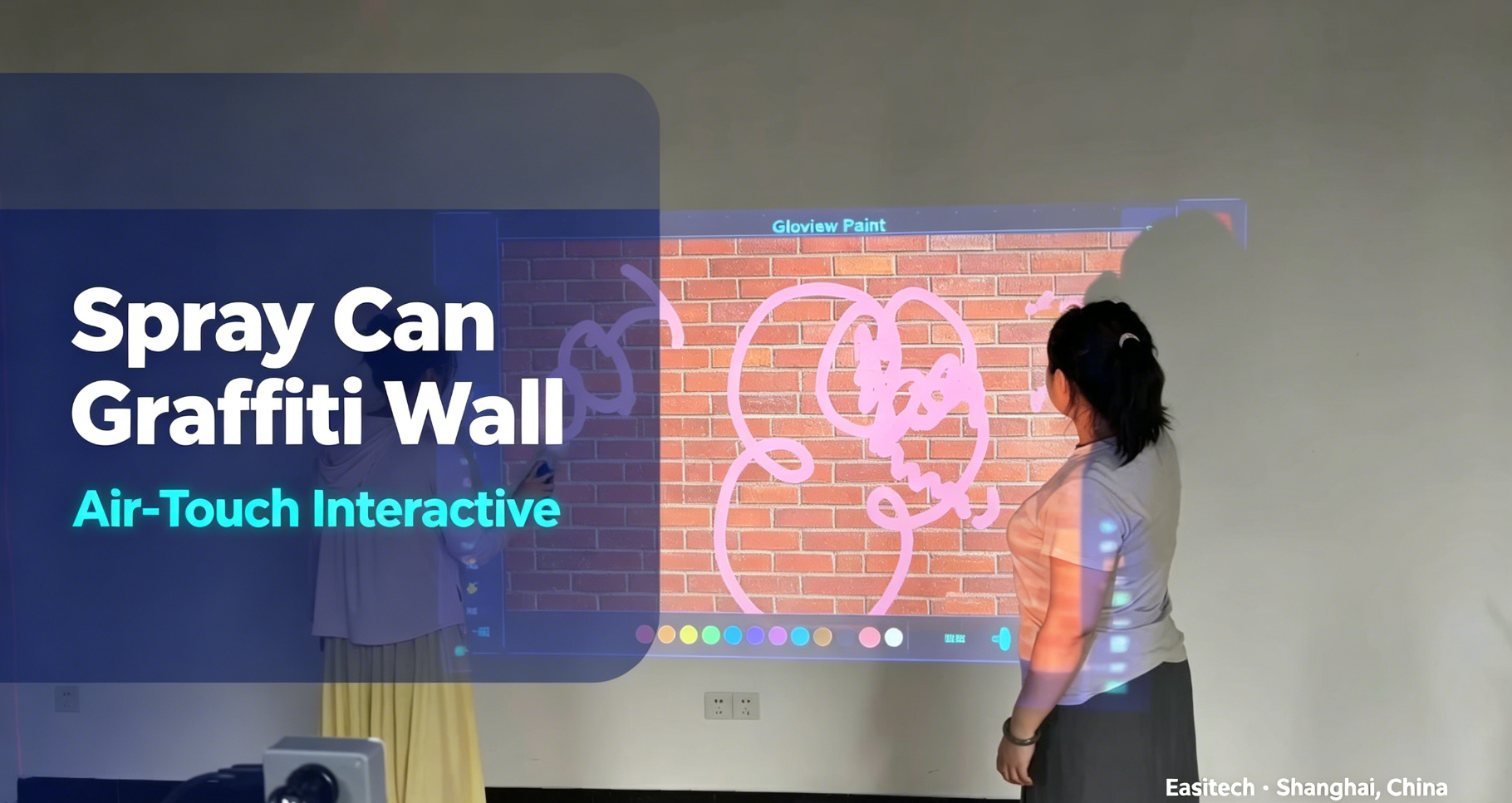
Gloview’s interactive spray-painting game introduces a new touch-free way to interact with projected content.
Users hold spray-can-shaped controllers and create digital spray-painting effects from a distance, without touching the projection wall. Their movements are detected and displayed in real time, allowing two players to create digital graffiti together on a large projected surface.
Both the spray-can interaction hardware and the game software are independently developed by Shanghai Easitech Computer Technology Co., Ltd. under the Gloview brand. The complete solution combines our original controllers, sensing technology, projection interaction system and game software.
See how two players use handheld spray-can controllers to create digital graffiti on a projection wall in real time.
Watch the interactive spray-painting game on YouTube
Can an Existing Projection Wall Become Interactive?
In many projects, an existing projection wall can be upgraded by adding an external interaction system. This may avoid major changes to the projection surface or surrounding structure.
The appropriate solution depends on several project conditions:
Projection area and aspect ratio
Wall size, shape and surface material
Required drawing or selection accuracy
User distance from the wall
Number of expected users
Projector placement and ambient light
Installation and maintenance requirements
The interaction hardware, projection system, game software and on-site environment should therefore be evaluated as one complete system.
Choosing a Technology for an Interactive Drawing Wall
Several sensing technologies can be used to add interaction to a projected surface. Each has different installation and performance characteristics.
Radar-Based Interaction
Radar sensing can be useful for detecting broad movements, presence and larger gestures. However, system performance varies by product and installation environment. Applications involving fine drawing, accurate menu selection or continuous path tracking may require a more precise sensing method.
Infrared Touch Frames
An infrared frame can provide direct touch interaction around a flat display or projection area. The frame must normally be installed around the active surface, which may affect the appearance of a wall-based installation.
Maintenance can also require access to the complete frame when individual emitting or receiving components develop problems. The suitability of an infrared frame depends on the wall structure, dimensions and desired visual finish.
Gloview LICT Technology
Gloview LICT uses modular sensing hardware and calibration software to support accurate interaction on large projected surfaces.
Depending on the selected configuration and project conditions, the system can use high-frame-rate cameras operating at up to 120 fps and support millimeter-level touch precision. Final performance must be confirmed according to the interaction area, installation distance, surface and surrounding environment.
The system is designed for operations that require controlled cursor positioning, including:
Drawing and continuous path tracking
Selecting colors or tools
Clicking and double-clicking
Annotation
Object selection
Menu control
Its modular design can also simplify servicing because an individual sensing module can be inspected or replaced without necessarily removing a complete frame from the wall. If alignment changes, the built-in calibration process can be used to recalibrate the interaction area.
How the Interactive Spray-Painting Game Works
The game turns a projected wall into a creative digital environment. Visitors interact with the software using hand movements or a compatible interactive controller.
Users can:
Select spray colors and creative tools
Move the cursor across the projected surface
Create digital spray, graffiti and painting effects
Follow themed game prompts
View their work immediately on the wall
Participate individually or as part of a shared experience
No real paint is applied to the wall. The visual effects are generated digitally by the game software and displayed through the projection system.
This makes it possible to create a spray-painting experience in indoor spaces where conventional paint would be unsuitable.
Why Accurate Tracking Matters
A creative application places greater demands on the interaction system than a simple button-triggered display.
If the detected position shifts away from the intended point, lines and spray effects will appear in the wrong location. If tracking is interrupted, the drawing path may become uneven. High latency can also make the digital tool feel disconnected from the user’s movement.
For this reason, the sensing method should be selected according to the type of interaction—not only the overall size of the wall.
Before choosing a configuration, project teams should test:
Accuracy across the complete active area
Continuous tracking during fast and slow movement
Interaction near the edges of the projection
User distance and operating position
Calibration recovery
Compatibility with the selected computer and software
Performance under actual site lighting conditions
Suitable Application Scenarios
The interactive spray-painting game can be considered for:
Museums and science centers
Cultural tourism attractions
Shopping malls
Brand experience centers
Digital art exhibitions
Children’s activity spaces
Immersive exhibition halls
Theme parks
Family entertainment centers
Interactive projection showrooms
The software theme, visual content and interaction flow can be evaluated according to the audience and project objective.
From Passive Viewing to Active Creation
A conventional projection wall asks visitors to watch. An interactive creative wall invites them to participate.
The spray-painting game changes the visitor from a viewer into a creator. This can encourage longer engagement and give venues a visual activity that is easy to understand and demonstrate.
For integrators and project owners, the solution also combines content and interaction hardware instead of treating the touch system as an isolated component.
Planning Checklist for Integrators
Before confirming a system, provide the following project information:
Width and height of the projection area
Photos or drawings of the installation surface
Projector model and installation position
Expected interaction distance
Required number of users
Computer and operating-system information
Indoor lighting conditions
Available mounting positions
Desired game language and content
Maintenance access requirements
These details help determine whether the proposed interaction method and hardware configuration are suitable.
Explore more interactive projection solutions and application options, or review the available product categories.
Related Gloview Solutions
- Interactive Projection Games
- Interactive Projection for Retail and Kids Entertainment
- Interactive Projection for Museums and Exhibitions
- Interactive Wall Projection System
Frequently Asked Questions
Can the game be added to an existing projection wall?
It may be possible if the projection area, computer, mounting positions and operating environment are suitable. The existing installation should be reviewed before selecting the sensing hardware.
Does the game use real spray paint?
No. The spray, graffiti and painting effects are generated digitally and displayed on the projection wall.
Can it work on a large wall?
Gloview LICT can be configured for large projected surfaces, but the appropriate coverage and hardware configuration depend on the wall dimensions, installation distance and required accuracy.
Is the software developed by EASITECH?
Yes. The interactive spray-painting game is part of EASITECH’s independently developed game software range and is designed to work with compatible Gloview interaction hardware.
Can the visual content or language be changed?
Available content and language options should be confirmed according to the project requirements and software version.
What information is needed for a configuration review?
Provide the projection dimensions, site photos, projector information, interaction distance, expected user count and intended application. These details allow the technical team to evaluate a suitable configuration.
Discuss Your Interactive Projection Project
If you are planning an interactive drawing wall, digital graffiti experience or projection-based game installation, share your project dimensions and site conditions with EASITECH.
Contact EASITECH for a configuration review.