
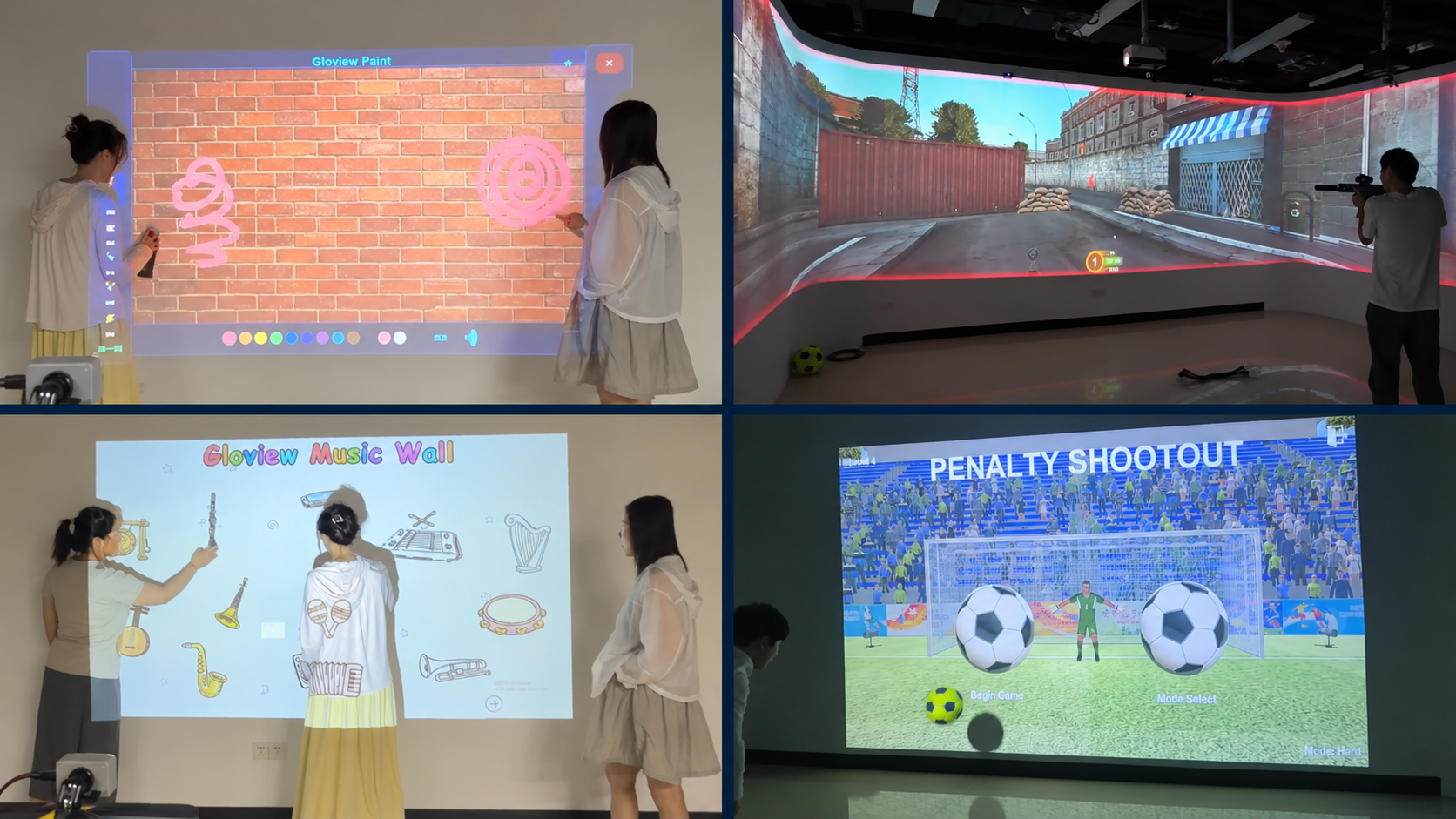
Interactive Projection Games: Painting, Shooting, Music and Football
What would you like visitors to do in front of a projection wall? Create a digital painting, aim at targets, touch illustrated instruments to hear music, or kick a real football in a penalty shootout game?
EASITECH’s Gloview interactive games bring these activities to large projected surfaces. Original game software is supplied with compatible interaction hardware, helping AV integrators, exhibition companies and entertainment project teams build experiences around the way visitors participate.
The four games below offer different forms of interaction—from direct wall touch to handheld controllers and physical football play.
Create Digital Art with Spray-Can Controllers
The touch-free spray-painting game invites visitors to create digital painting effects on a projected wall using handheld, spray-can-shaped controllers. They interact from a distance, without touching the wall or applying real paint.
The activity centers on creating a picture on a large shared canvas. Participants use the controllers to produce digital spray-painting effects, while people nearby can watch the picture develop.
For digital art areas, exhibition activities and brand experience spaces, this game offers a way to invite visitors into the creative process.
Explore the touch-free spray-painting game and its demonstration.
Aim at Projected Targets in Shooting Games
The projection shooting system offers scenario-based shooting, target practice and arcade-style challenges. Players use laser-emitting toy gun controllers to aim at targets in the projected game, with visible hit feedback and on-screen scores.
The different modes offer different styles of play: virtual environments for scenario-based action, defined targets for aiming practice, and colorful targets with animated effects for arcade-style challenges. The large projected scene also lets people nearby follow the action.
For indoor entertainment venues and experience centers, the choice can start with the type of game visitors would enjoy. Game selection and projection layout can then be discussed for the available space.
Explore the interactive projection shooting games.
Touch Illustrated Instruments to Hear Music
The interactive musical instrument wall uses direct contact with the wall. A visitor touches an instrument image, that image lights up, and a prerecorded musical excerpt featuring the instrument plays.
Visitors can explore different instruments through pictures and sound, individually or alongside others. No musical experience is needed to make a selection and hear the result. The activity focuses on discovering instrument sounds rather than playing individual notes or composing music.
This touch-and-listen format can be considered for children’s discovery areas, museum exhibits, educational activity spaces and family venues.
Explore the interactive musical instrument wall.
Play a Penalty Shootout with a Real Football
The penalty shootout game combines a real football with a projected stadium, goal and goalkeeper. Participants take part by kicking the ball, bringing a physical sporting activity into the projection experience.
The large projected scene provides the football setting, while spectators can watch both the player’s actions and the game display.
For entertainment spaces and experience projects looking to include sports interaction, penalty shootout offers another way to participate alongside wall-touch activities and controller-based games.
https://easitech.com.cn/products/interactive-game-systems/interactive-football-penalty-shootout/
Choose the Visitor Activity First
A useful starting point is the action you want visitors to take:
| Visitor activity | Game | How visitors interact | | -------------------------------- | ------------------------- | ------------------------------------------------------------- | | Create a digital picture | Spray-painting game | Use a spray-can-shaped controller to interact from a distance | | Aim at projected targets | Projection shooting games | Use a laser-emitting toy gun controller | | Discover instrument sounds | Musical instrument wall | Touch an instrument image to hear a musical excerpt | | Take part in a football activity | Penalty shootout | Kick a real football to participate in the projected game |
These activities give project teams different starting points for content selection. A creative area might begin with digital painting, a music discovery exhibit with the instrument wall, or a sports-themed entertainment space with penalty shootout.
Watching the individual demonstrations can help your team compare the experiences before discussing the installation. For exhibition projects, you can also explore our museum and exhibition applications.
Original Software with Matching Interaction Hardware
EASITECH develops Gloview game software and interaction hardware, with software and compatible hardware supplied together. This allows project teams to consider the game content and the way visitors control it as one system.
Different activities require different arrangements. A touch-based music wall, a handheld-controller game and a football installation should each be reviewed according to the intended experience and available space.
The equipment list should be confirmed for each project, including whether projectors, computers, audio equipment and installation services are part of the agreed supply.
Frequently Asked Questions
Do all four games use direct wall-touch interaction?
No. The musical instrument wall responds to direct touch on the projected instrument images. The spray-painting and shooting games use handheld controllers to interact with projected content from a distance, without touching the wall. The penalty shootout game uses a real football, with participants interacting by kicking the ball.
Are the games supplied with interaction hardware?
Yes. Gloview game systems combine original software with compatible interaction hardware. The exact equipment included should be confirmed for the selected game and project.
Does the musical instrument wall let visitors play individual notes?
The version described here plays a prerecorded musical excerpt when a visitor touches an instrument image. The selected image lights up to connect the visitor’s action with the picture and sound.
What if we already have a projection installation?
Tell EASITECH what equipment and space you already have. The existing setup needs to be reviewed before confirming a suitable game configuration.
Do we need a complete technical plan before contacting you?
No. Start with the game you are interested in and the type of venue. A photo or reference example can help explain your idea, and further details can be discussed as the project develops.
Discuss Your Interactive Game Project
Planning an interactive area for an exhibition, visitor attraction or entertainment venue? Tell us which game interests you and where you would like to use it.
Browse the Gloview game systems and use the project inquiry button to start a conversation with EASITECH.