
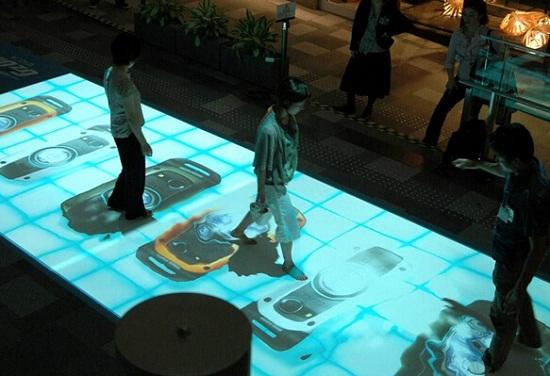
A floor can become more than a surface people walk across. With interactive floor projection, footsteps can trigger visual effects, reveal hidden images, select answers or become part of a shared game.
In a children’s play area, this creates a space to explore through movement. In a classroom, it offers another way to participate in a learning activity. In a museum or science center, it gives visitors an active role in discovering the content around them.
The experience can also extend onto a wall. Actions on the floor can influence a larger projected scene, or both surfaces can become interactive parts of the same activity.
A successful project starts with the people who will use it: what they should experience, how they can participate and what the space needs to achieve. EASITECH works with customers and integration partners to discuss these requirements and develop an appropriate combination of interactive content, projection and sensing equipment.
Turn Movement into Participation
Interactive floor projection combines projected content with an interaction detection system. The application determines how a detected action changes the visuals or advances an activity.
A simple experience might begin with stepping on a target. A more developed application could introduce choices, sequences, shared tasks or a story that progresses as participants move.
Depending on the content, activities can include:
- Discovery: Reveal images, explore a scene or find objects related to a theme.
- Choices and answers: Select a projected picture, category or answer area.
- Shared play: Take turns or work together on a common task.
- Connected storytelling: Use floor interactions to influence a scene displayed on a wall.
The right pace and level of complexity depend on the audience. A quick game in an indoor playground and a guided activity in a special education classroom may use similar physical spaces while requiring very different content.
Interactive Floor Games for Children’s Play Areas
In indoor playgrounds, children’s activity spaces and family entertainment centers, interactive floor games can combine physical movement with digital play.
Content can be planned around finding targets, choosing pictures, exploring nature or completing a group challenge. Children participate through movement, while parents or staff can guide the activity or join in.
The experience should make the first action easy to understand. Participants need to see where to begin, recognize the response to their movements and understand what to do next.
For shared play, the content and layout should also account for how people enter the activity and use the space together. Clear activity boundaries, suitable circulation space and room for accompanying adults help the installation fit into the wider venue.
Bring Learning into Motion
Interactive floor projection gives educators a way to connect learning tasks with physical participation.
With suitable educational content, activities can be built around colors, shapes, numbers, animals, classification or storytelling. Students make choices through movement, and teachers use the resulting feedback to explain, ask questions or guide further exploration.
For example, an activity could invite students to find a matching shape, select a number or identify an object connected to a lesson. These are content development possibilities; the available activities depend on the selected software.
Combining floor interaction with wall projection adds another dimension. The wall can present a story, question or environment, while the floor provides choices and discovery tasks. This arrangement can help teachers organize several related actions around one theme.
The educational value comes from the relationship between the activity and the learning objective. The projection provides a shared setting; the content and teaching approach give it purpose.
Support Participation in Special Education
Special education is an important application area for interactive floor projection. When matched to individual needs, it can give teachers a practical way to organize activities around movement, visible responses and shared exploration.
For some learners, a concrete action followed by clear feedback offers an accessible starting point. A task can begin with one target and one response, then develop as the learner becomes familiar with the activity.
Explore Cause and Effect
In published accounts of special education practice, interactive floor activities have included moving virtual leaves aside, revealing hidden pictures and exploring projected sea creatures.
These activities give learners an opportunity to experience a direct connection between an action and its result: they move, the image changes, and they can try again.
For a new project, similar principles can guide content selection. A clear target, a manageable action and an understandable response provide a useful basis for teacher-led exploration.
Offer Different Ways to Respond
An interactive activity can allow learners to express a choice through movement rather than relying solely on a spoken answer.
For example, a teacher could invite a student to select between two projected images. The target size, required movement and detection arrangement would need to suit that student’s abilities.
This makes the interaction method part of the educational planning. The question is not simply what the system can detect, but what the learner can comfortably and meaningfully do.
Create Opportunities for Turn-Taking
A shared projected surface can provide a setting for taking turns, watching another person’s action and responding together.
In some school practices, interactive floors are used within guided activities that encourage turn-taking and shared exploration. A teacher can structure the session around waiting, choosing, observing and communicating.
The activity provides the context for participation. Its value depends on the teaching approach, the content and the needs of the learners involved.
Build Themes Students Can Explore
Seasons, animals, natural environments and stories can become visible settings for learning activities.
A proposed ocean-themed session, for example, could combine an underwater scene on the wall with discoveries on the floor. A teacher could use these discoveries to guide naming, choosing, describing or shared observation.
For special education classrooms and sensory learning spaces, visual complexity, sound, pace and movement requirements should be discussed with the teaching team. Seated participation or the use of mobility aids should be assessed against the specific sensing configuration.
Interactive floor projection is an educational tool. Its role is to support appropriately designed activities, with content and interaction matched to each learner.
Make Museum and Science Center Visits More Participatory
In museums, science centers and interactive exhibitions, a projected floor can become part of how visitors explore a subject.
Content could invite visitors to discover an ecosystem, answer a question, follow a sequence or complete a shared challenge. Their actions become a way to access information and see the consequences of a choice.
Wall projection is useful when the activity needs a larger scene, a question visible to a group or a shared results display. Participants interact on the floor while others can follow the activity on the wall.
Where interaction on both surfaces is required, the experience can move between them. A visitor might complete a floor-based task before selecting an object on the wall. The application should make this sequence clear and support the intended visitor flow.
Extend the Experience from Floor to Wall
Different projects need different relationships between the display and the interaction area. Three arrangements provide useful starting points for discussion.
| Arrangement | How people participate | Experience opportunities |
|---|---|---|
| Interactive floor | Actions take place within the projected floor area | Floor games, discovery activities and educational choices |
| Interactive floor with wall display | Floor actions influence content shown on the wall | Storytelling, questions and shared visual feedback |
| Interactive floor and wall | Participants interact with both surfaces | Connected tasks, collaborative activities and immersive exploration |
Interactive Floor
The main visuals and interaction remain underfoot. Activities are organized around a defined floor area, with content designed for participants looking down and moving within that space.
Interactive Floor with Wall Display
The floor provides the interaction, while the wall presents scenes, prompts or results.
The wall does not need touch detection equipment in this arrangement. The application connects floor actions to the wall content.
Interactive Floor and Wall
Both surfaces accept interaction. An L-shaped wall-and-floor layout creates opportunities for activities that connect the space underfoot with the surface in front of the participant.
This requires content designed for both interaction areas. The application should clearly indicate where to look, where to act and how each action contributes to the experience.
Equipment Placement Behind the Experience
Projection, sensing and content need to work together. Equipment positions should be planned around the effective interaction areas and the conditions of the room.
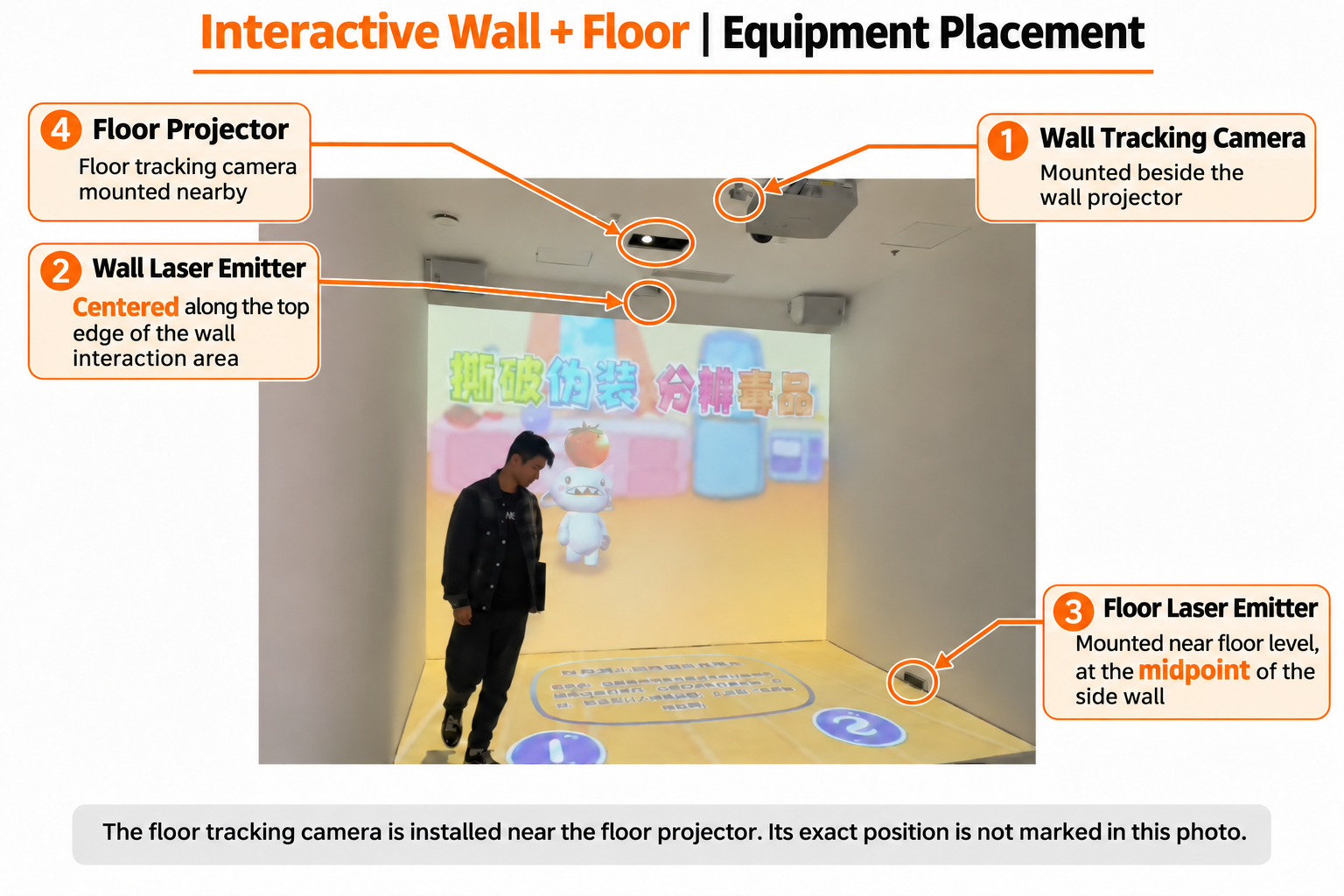
In the EASITECH L-shaped installation discussed here, the floor and wall each have their own interaction sensing components.
Floor Interaction Equipment
The floor projector is installed overhead and projects downward. The floor tracking camera is mounted near the floor projector.
The floor laser emitter is installed near floor level, at the midpoint of the side boundary of the intended floor interaction area.
This midpoint should be determined from the active area, rather than assumed to be the center of the entire room. Final placement depends on the site layout and required coverage.
Wall Interaction Equipment
The wall tracking camera is installed beside the wall projector.
The wall laser emitter is centered along the top edge of the wall interaction area.
For an interactive floor with a display-only wall, the wall tracking camera and wall laser emitter are not required.
Computer Control, Projection Blending and Calibration
The configuration discussed here can use projection blending, run from one computer and be set up through a single automatic calibration process. The final arrangement needs to be confirmed against the projection layout, computer outputs, performance requirements and application compatibility.
Projection blending handles image composition and transitions. Interaction calibration aligns detected positions with the displayed content. The application connects actions across the floor and wall.
Together, these elements support the intended experience.
More L-Shaped Interactive Applications Are Coming
EASITECH’s content development team is preparing future Gloview Games applications for L-shaped wall-and-floor installations.
These upcoming applications will expand the content options available for connected interaction across both surfaces. Further details about the activities and releases will be announced as development progresses.
Stay tuned for more from Gloview Games.
Let’s Plan the Experience for Your Space
Each project has different priorities.
A children’s play area may focus on easy participation and shared games. An educational space needs activities connected to learning objectives. A special education project requires closer discussion of individual participation and sensory preferences. A museum installation needs interaction that supports the exhibition’s subject.
To begin a discussion with EASITECH, share:
- The venue type, intended audience and experience you want to create.
- Available floor and wall dimensions, ceiling height and site photographs.
- Any existing projectors, displays or computers.
- The actions participants should perform on the floor and wall.
- Whether you already have content or need compatible interactive applications.
- Any teaching objectives or participation requirements the design should address.
EASITECH can work with your team to discuss interactive content and equipment placement, shaping a floor or wall-and-floor projection solution around your space and its users.